View cart “Merge All GSTR-2A and Send to Tally” has been added to your cart.
Sale!
Download All GST Return Data in Excel from GSTIN Portal in Single Click
₹1,999.00₹999.00
Download GST returns, GSTR-1, GSTR-2A, GSTR-2B, IMS, E-Invoice, ITC Ledgers, Cash Ledgers, and much more—all from Microsoft Excel with just a few clicks.
This utility is designed for Chartered Accountants, Tax Consultants, Accountants, GST Practitioners, and Businesses to simplify GST compliance and save valuable time.
Product Features
GSTR-3B
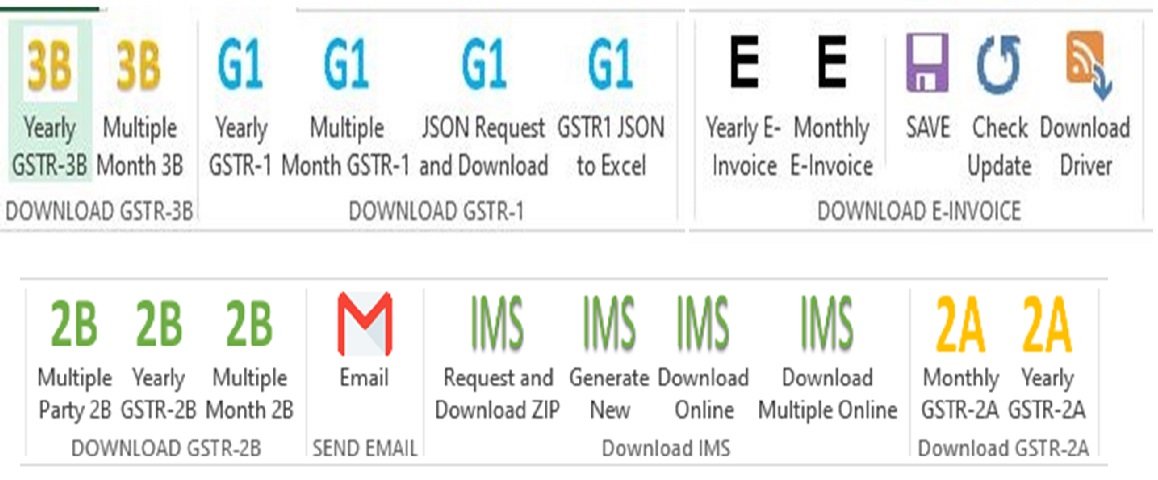
✔ Download the complete Financial Year’s GSTR-3B with a single click.
GSTR-1
✔ Download the complete Financial Year’s GSTR-1 with one click.
✔ Download multiple selected months of GSTR-1 simultaneously.
✔ Request and download the complete Financial Year’s GSTR-1 JSON.
✔ Convert GSTR-1 JSON into Excel with a single click.
GSTR-2B
✔ Download GSTR-2B for multiple GSTINs for any selected month.
✔ Send downloaded GSTR-2B or IMS reports of multiple parties through email in one click.
IMS (Invoice Management System)
✔ Request and download IMS ZIP files.
✔ Generate new IMS ZIP download requests.
✔ Download IMS (All Other ITC) online without downloading ZIP files.
✔ Download IMS (All Other ITC) for multiple GSTINs with one click.
GSTR-2A
✔ Download multiple selected months of GSTR-2A into a single Excel file.
✔ Download the complete Financial Year’s GSTR-2A with one click.
E-Invoice
✔ Download the complete Financial Year’s E-Invoice data.
✔ Download selected months’ E-Invoice data.
ITC & Ledgers
✔ Download Tax Liability and ITC Comparison.
✔ Download Electronic Credit Ledger (ITC Ledger).
✔ Download Electronic Cash Ledger.
Additional Features
✔ Automatically check for software updates.
✔ Download the latest compatible ChromeDriver directly from Excel.
✔ All operations are performed within Microsoft Excel.
✔ Only CAPTCHA entry is required during login.
✔ Supports downloading data for multiple GSTINs.
✔ Fast, reliable, and user-friendly interface.
System Requirements
• Microsoft Excel 2010 or later
• Microsoft .NET Framework 3.5
• Google Chrome
• Windows Operating System
Installation Instructions
Save the utility and all setup files in the same folder.
Ensure no unnecessary files are present in the folder.
Right-click the application and select Run as Administrator.
Follow the on-screen instructions to start using the software.
License Information
• License key will be issued within 24 hours of purchase.
• License validity: 1 Year.
• License can be activated on one computer only.
• Activation codes will not be reissued for a different computer under any circumstances.
Important Information
• By using this utility, you agree that the information entered into the software may be shared with Taxes India solely for licensing, activation, and support purposes in accordance with applicable laws.
• This software is developed by an independent publisher and is not Microsoft certified. Windows Security or antivirus software may display a warning during installation. If prompted, please add the application to your Windows Security or antivirus exception list before running it.
• Bulk email functionality uses Gmail SMTP. A standard Gmail account currently allows sending up to 500 emails per day. Please configure Gmail SMTP before using the bulk email feature.
• Detailed instructions for configuring Gmail SMTP are included with the software.




Reviews
There are no reviews yet.